function MyRecordLayer:onCreate()
    self:registerScriptHandler(handler(self, self.onNodeEvent))
    print("22222")
end

function MyRecordLayer:onNodeEvent(event)
    if event == "enterTransitionFinish" then
        print("进入完成")
    elseif event == "enter" then
        print("开始进入")
    elseif event == "exit" then
        print("退出")
    end
end
registerScriptHandler注册基本事件,包括触屏、层的进入退出等
local MainScene = class("MainScene", cc.load("mvc").ViewBase)

function MainScene:onCreate()
    local circleProgressBar = cc.ProgressTimer:create(cc.Sprite:create("HelloWorld.png")) --创建进度条 --knowledge
    circleProgressBar:setType(cc.PROGRESS_TIMER_TYPE_RADIAL) --设置类型
    circleProgressBar:setReverseDirection(true) --设置顺时针
    circleProgressBar:setPercentage(100) --设置进度
    self:addChild(circleProgressBar)
    circleProgressBar:setPosition(cc.p(display.cx,display.cy))

    self.currentPercent = 100
    self.circleProgressBar = circleProgressBar
    self:scheduleUpdateWithPriorityLua(handler(self,self.update),0.5)
end

function MainScene:update()
    self.currentPercent = self.currentPercent - 1
    self.circleProgressBar:setPercentage(self.currentPercent)
end

return MainScene
--预加载
ccs.ArmatureDataManager:getInstance():addArmatureFileInfo("games/lord/effect/doudizhu4_beijing/doudizhu4_beijing.ExportJson")
--使用,直接使用文件的名字就行了,不用路径
self.armtureWinBox = ccs.Armature:create("doudizhu4_beijing") --背景动画
local bgAni = self:seekNodeByName({"Armature_bg"},self.m_pNodeBg)
self.armtureWinBox:getAnimation():play("aa") --播放指定名字的动画
bgAni:addChild(self.armtureWinBox)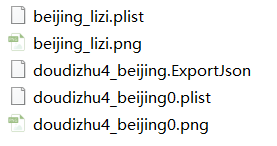
local MainScene = class("MainScene", cc.load("mvc").ViewBase)

function MainScene:onCreate()

    --使用系统字体
    self.lab = cc.Label:createWithSystemFont("Hello World", "Arial", 40)
        :move(display.cx, display.cy + 200)
        :addTo(self)

    --使用资源字体
    self.lab2 = cc.Label:createWithTTF("你是","font/msyhn_boot.ttf",36)
        :move(display.cx,display.cy + 100)
        :addTo(self)

    local config = {}
    config.fontFilePath = "font/msyhn_boot.ttf"
    config.fontSize = 50
    self.lab3 = cc.Label:createWithTTF(config,"HeiHei")
        :move(display.cx,display.cy)
        :addTo(self)

    --使用位图字体 fnt-png
    self.lab4 = cc.Label:createWithBMFont("font/number0-9.fnt","2019")
        :move(display.cx,display.cy - 100)
        :addTo(self)
    self.lab4:setString("2020")
end

return MainScene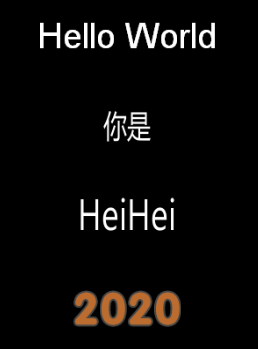
function MainScene:onCreate()
    self.spr = display.newSprite("HelloWorld.png")
        :move(display.center)
        :addTo(self)

    self.lab = cc.Label:createWithSystemFont("Hello World", "Arial", 40)
        :move(display.cx, display.cy + 200)
        :addTo(self)

    self.spr:setPosition(600,300)
    self.lab:setPosition(350,500)
    local px,py = self.spr:getPosition()

    --把世界坐标px,py转换到lab下的本地坐标
    local p = self.lab:convertToNodeSpace(cc.p(px,py))
    print(p.x,p.y) --250 -200
    --将参考lab的本地坐标p转换到世界坐标
    local wp = self.lab:convertToWorldSpace(cc.p(p.x,p.y))
    print(wp.x,wp.y) --600 300
end
Node类封装了Scheduler类,可以使用定时器对对象的运行进行调度。
local MainScene = class("MainScene", cc.load("mvc").ViewBase)

function MainScene:onCreate()
    self.lab = cc.Label:createWithSystemFont("Hello World", "Arial", 40)
        :move(display.cx, display.cy + 200)
        :addTo(self)

    --第一个为执行的方法,第二个为多少时间s执行一次
    self:scheduleUpdateWithPriorityLua(handler(self,self.update),1/60)
    --self:unscheduleUpdate()  停止调度

end

function MainScene:update()
    self.lab:setRotation(self.lab:getRotation() + 1)
end

return MainScene
lab:setAnchorPoint(cc.p(0,0))
lab:setPosition(cc.p(display.cx,display.cy + 100))
所谓的锚点(0,0)就是左下角,(1,1)就是右上角,如果说设置锚点为(0,0),然后设置位置,就是说要把锚点左下角放到设置的位置去。旋转同样的是参考的锚点,以锚点为中心进行旋转。
local lab = cc.Label:createWithSystemFont("Hello World", "Arial", 40)
    :move(display.cx, display.cy + 200)
    :addTo(self)

local node = cc.Node:create() --创建一个Node节点
self:addChild(node,0,123)
local node2 = self:getChildByTag(123)
if node == node2 then
    print("同一个节点")
    self:removeChildByTag(123,true) --通过标签删除子节点并停止该节点的活动
end

self:removeChild(lab,true) --self为场景来的
self:removeAllChildren(true) --删除所有子节点并停止一切活动
lab:removeFromParent(true) --从父节点删除lab节点并停止活动
场景、层、精灵、菜单、文本、地图和粒子系统等等都是继承Node,一个场景可以包含多个层,一个层又包含多个精灵、菜单、文本、地图,节点下可以放置其它节点,从而构建一个树状结构的层级关系。
因为场景中的元素都是继承自Node,所以一些Node的基本操作贯穿了整个游戏。
使用框架内的win32模拟器后,就可以在运行中的黑窗口中打印东西了,打印的方法为:
print("12454545")
local t = {}
t.name = "chitu"
dump(t,"t")